If you’ve ever spent hours perfecting a travel blog post — only for it to get barely any clicks — you’re not alone. Most travel bloggers struggle with the same question: What are people actually searching for when they plan a trip? That’s where Perplexity AI comes in. It’s an AI-powered research tool that helps you uncover the questions real travelers ask, the topics they care about, and the keywords they naturally use — all in one place.
Instead of guessing what to include in your next post, you can use Perplexity to:
- See what travelers are asking online about your destination,
- Find gaps in your content (like missing tips, attractions, or FAQs),
- Discover related keywords straight from those questions,
- And structure your post so it’s easy for both readers and search engines to understand.
In this guide, we’ll walk through exactly how to do that — step by step — using a hypothetical post, “A week in Ischia,” as our example. You’ll learn how to research your audience, organize your ideas, optimize your structure, and measure your results using Perplexity, GA4, and SEMrush.
By the end, you’ll know how to use AI tools, especially Perplexity, to write travel content that’s not just beautiful but discoverable.
Table of Contents
What Perplexity AI is and how it helps with SEO research
If you’ve never heard of Perplexity AI, you’re not alone.
Most travel bloggers know about tools like ChatGPT, but few realize that Perplexity is an entirely different kind of tool — one built for research rather than writing.
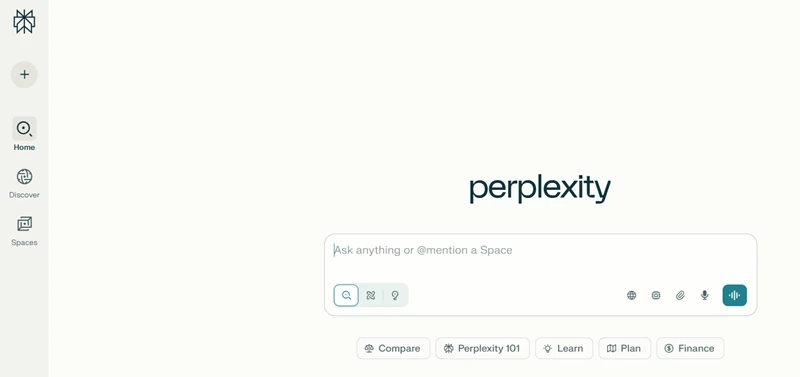
Think of Perplexity as a search engine powered by artificial intelligence. Instead of showing you a list of links like Google does, it reads through reliable sources and gives you a concise, summarized answer — often including extra insights you might not have thought of. It also lists where that information came from, so you can check and trust what you’re reading.
That makes it a great tool for SEO and content planning, especially when you’re trying to figure out what travelers want to know before visiting a destination.
Here’s what makes it so useful for travel bloggers:
- It acts more like a local guide than a search engine.
For example, if you ask “What should I do during a week in Ischia?”, Perplexity might give you an itinerary-style answer with day-by-day ideas — morning spa visits, scenic hikes to Mount Epomeo, and ferry trips to Procida. It doesn’t just list results; it helps you understand what’s typical for travelers planning a similar trip.
- It reveals what people are asking.
One of the best parts is the “Related” section. After your first query, you’ll see questions that real users ask next, like:
- “Which thermal spa in Ischia is best for couples?”
- “Is Ischia better than Capri for a week-long trip?”
- “What’s the easiest way to get around Ischia without a car?”
Each of those is a ready-made keyword or blog subtopic you could include.
- It helps you spot what your post might be missing.
Let’s say your original draft focuses on beaches and restaurants, but Perplexity keeps mentioning thermal parks or boat tours around the island. That’s a sign you can expand your content to make it more complete and more aligned with what travelers expect to find.
- It speeds up your research process.
Instead of opening dozens of tabs — TripAdvisor, Lonely Planet, blogs, ferry sites — you can ask one smart question in Perplexity and instantly see what travelers care about, along with source links to dig deeper.
In short, Perplexity is like having a travel SEO assistant. It helps you:
- Understand what travelers are curious about,
- Uncover new keyword ideas straight from real user questions, and
- Build content that feels useful, complete, and easy for both Google and AI tools to understand.
You don’t need to be a tech expert to use it. All you need is curiosity and the right questions to ask.
Step-by-step: how to use Perplexity to plan and improve your travel post
Now that you know how Perplexity works and what kind of content it prefers, let’s see how you can actually use it to plan or improve your next travel blog post.
We’ll use a consistent example throughout — a hypothetical blog post “A week in Ischia” — and walk step-by-step through the process: from asking your first question to turning Perplexity’s insights into a better, SEO-friendly post.
Example scenario: “A week in Ischia”
Let’s imagine you’ve already written a blog post titled “A week in Ischia”. It currently looks something like this:
Original post (before Perplexity)
Headings:
- Day 1: Arrival
- Day 2: Beaches
- Day 3: Thermal Parks
- Day 4: Castle Visit
- Day 5–7: Free Days
Keywords included:
- Ischia itinerary
- best beaches in Ischia
- thermal spas
Not bad, but it’s missing the real questions travelers are asking online. There’s no section about transport, no comparisons with Capri, and no local tips that travelers often search for.
Let’s fix that using Perplexity.
Step 1: Start with one simple question
When you open Perplexity, begin with a broad, natural question — something a traveler would genuinely ask.
For example: “What should I do during a week in Ischia, Italy?”
Here’s what Perplexity might return (simulated snippet):
Perplexity’s summary: “A week in Ischia, Italy, offers a blend of historic sites, natural thermal spas, beautiful beaches, lush gardens, and hiking opportunities, perfect for relaxation and exploration.”
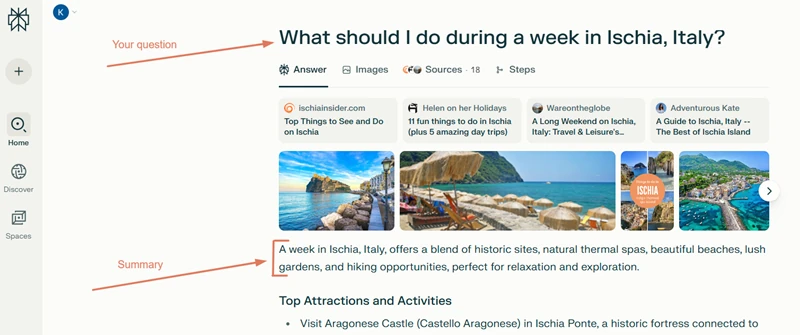
Take a few seconds to read through the entire answer and note:
- Which themes appear most often (spas, castles, transport)?
- Which locations repeat (Sant’Angelo, Forio, Poseidon Gardens)?
- What tone or structure the summary uses (is it a list, itinerary, or overview?).
These initial clues tell you what travelers expect to see — and what your post might need to cover or expand on later.
Step 2: Explore the “Related” questions
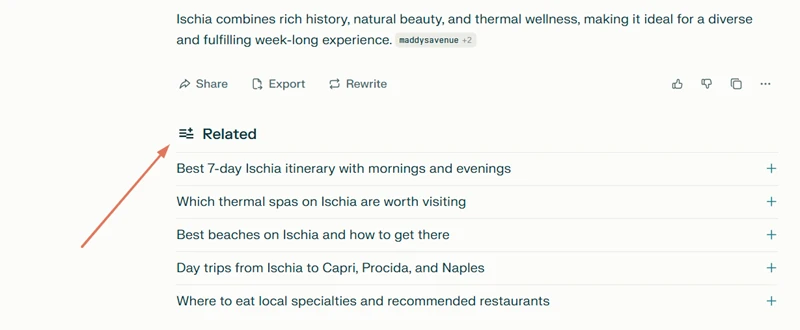
Scroll down to the Related section — this is where the real gold is. These follow-up questions come directly from what other users are asking, and they’re incredibly useful for keyword and topic research. Each time you click on one, Perplexity generates a new set of follow-up questions related to it, letting you explore topics in even more depth and uncover additional content ideas.
You might see questions like:
- “Which thermal spas on Ischia are worth visiting”
- “Best beaches on Ischia and how to get there?”
- “Day trips from Ischia to Capri, Procida, and Naples?”
What to do:
- Copy the most relevant ones into a notes file.
- Use them as subheadings (H2s) or FAQ questions in your post.
- Group similar ones into categories — for example, “Getting there,” “Getting around,” and “Where to stay.”
This gives your post a question-based structure that matches real travel search intent — something both readers and AI systems prefer.
Step 3: Spot missing angles in your draft
After exploring Perplexity’s answers and related questions, it’s time to see how your current post compares.
Start by asking yourself:
- Does my post mention the same main attractions people are asking about?
- Have I covered practical details like prices, travel times, or local transport?
- Are there sections I could add to make it more complete or up to date?
For example, you might realize that while your draft focuses on beaches and restaurants, it doesn’t mention thermal parks, boat tours, or local bus routes — all popular Ischia experiences.
Those missing details are your content gaps. Filling them makes your post more helpful for readers and more relevant for search engines.
Once you’ve identified what’s missing, reorganize your outline to match what travelers actually want to read.
| Before | After (inspired by Perplexity) |
|---|---|
| Day 1: Arrival | How to get to Ischia and travel around without a car |
| Day 2: Beaches | Best beaches in Ischia (and which ones locals love) |
| Day 3: Thermal Parks | Which Ischia thermal park is worth visiting? |
| Day 4: Castle Visit | Is Aragonese Castle worth the climb? |
| Day 5–7: Free Days | Suggested 7-day Ischia itinerary (with local tips) |
| — | Is Ischia better than Capri for a week-long holiday? |
| — | FAQ: What’s the best month to visit Ischia? |
See how your post now speaks directly to travelers — with headings that sound conversational, practical, and keyword-rich, all based on real search intent.
Step 4: Gather natural keyword ideas
You’ll notice that Perplexity’s answers contain keywords in disguise — real phrases travelers use when searching. Look for these in summaries, subheadings, and related questions.
For example, Perplexity might repeat terms like:
- Ischia itinerary 7 days
- Poseidon Thermal Gardens
- boat tour around Ischia
- Ischia bus routes
- budget-friendly thermal parks
- best area to stay in Ischia without a car
What to do:
- Note these down in a simple spreadsheet or notebook.
- Use them naturally in your headings, paragraphs, image alt text (see this guide on writing image alt tags for travel photos), and FAQ answers.
- Don’t overthink SEO density — the goal is to make your post sound natural but complete.
If you’d like, you can plug those phrases into SEMrush, Ahrefs, or Google Keyword Planner to check their search volume, but don’t worry if some are low — Perplexity often surfaces emerging or niche queries that traditional keyword tools miss.
Step 5: Enrich your copy with new insights
Now, use what you found to add missing sections or improve weak ones.
Original section: “Day 3: Thermal Parks” — two short sentences about visiting a spa.
After using Perplexity:
“Ischia’s thermal parks are world-famous, but not all are equal. Poseidon Gardens in Forio and Negombo in Lacco Ameno are the most popular, both offering volcanic pools overlooking the sea.
If you’re visiting Ischia for the first time, Poseidon Gardens is perfect for a full-day spa experience. The complex has over 20 pools with different temperatures, a private beach, and stunning sea views that make it one of the island’s most photographed spots. It can get busy in summer, so aim to arrive early or visit on a weekday for a more relaxing experience.
Negombo, on the other hand, feels more intimate and natural, surrounded by gardens and shaded paths. It’s smaller but beautifully designed, with saltwater pools carved into the rocks and a calmer, more local vibe. Travelers often describe it as the perfect spot to unwind after a day of exploring or hiking Mount Epomeo.
Both parks are easy to reach by bus or taxi, and tickets can be booked online.”
You can also enrich other parts of your post with quick comparison visuals:
| Day | Activity | Where | Insider tip |
|---|---|---|---|
| 1 | Thermal spa day | Poseidon Gardens | Arrive before 10 AM to avoid crowds |
| 2 | Explore Ischia Ponte | Aragonese Castle | Climb to the top for sunset views |
| 3 | Beach hopping | Maronti & Citara | Bring water shoes for rocky shores |
Format your post for clarity
AI (and Google) understand your content better when you format it clearly. Simple structures make your article easier to read and more likely to appear in AI summaries.
Here’s what helps:
- Lists: use bullet points for places, tips, or highlights.
- Tables: organize data like ferry prices, day-by-day itineraries, or travel times.
- Subheadings: include one idea per H2 or H3.
- FAQs: answer short, common questions at the end.
Formatting this way improves readability, makes your content easier to scan, and increases the chance that AI tools will extract or cite your text.
For a deeper look at how structure impacts AI visibility, see my full guide on how to structure travel content for AI visibility
Step 6: Add FAQs using Perplexity’s related questions
Create a small FAQ section at the end — this is great for SEO and for AI visibility.
FAQ: Planning a week in Ischia
Q: What’s the best month to visit Ischia?
A: May, June, and September offer warm weather and fewer crowds.
Q: Which area is best for couples?
A: Sant’Angelo and Forio are both romantic, with sea-view restaurants and spa hotels.
Q: How long does the ferry from Naples take?
A: Between 50 minutes and 1.5 hours, depending on the route.
You’ve just transformed reader curiosity into SEO value.
Step 7: Validate and refine your ideas
Before finalizing, ask a few follow-up questions to check what else you might include. For example:
- “What do travelers look for in a 7-day Ischia itinerary?”
- “What are common mistakes tourists make when visiting Ischia?”
Perplexity might highlight things like “not booking sunbeds at the local bagni near the Aragonese Castle in advance” or “underestimating travel times between towns” — small yet valuable tips that make your content stand out as authentic and helpful.
Each new question adds depth and freshness to your post, which both AI and human readers appreciate.
Quick tip
If you find a source in Perplexity’s results that feels relevant (like an official travel guide or local tourism board), link to it in your post. It strengthens your credibility, gives readers helpful context, and improves your chances of being cited as a trusted source in future AI summaries.
Step 8: Keep your content fresh
Once your Ischia post is published, make a habit of updating it every few months, especially before each new travel season.
Even small edits help:
- Update ferry prices, opening hours, or hotel recommendations.
- Add one or two new FAQs based on what travelers are asking now.
- Recheck Perplexity for new questions — you might find trending searches like “best wellness retreats in Ischia 2026.”
Updating signals freshness, which improves both your Google ranking and your AI visibility over time.
Step 9: Compare your before-and-after results
| Before | After |
|---|---|
| Basic itinerary format | Question-based structure that mirrors real traveler intent |
| Few keywords | Naturally includes long-tail terms like Ischia itinerary 7 days and best areas to stay in Ischia |
| Missing travel details | Adds transport, spa recommendations, and comparisons |
| No FAQs | Includes question-driven FAQ block |
| Harder to skim | Clear headings, lists, and tables that aid readability and AI extraction |
By following these nine steps, you’ve turned an average travel post into a well-structured, keyword-rich, and traveler-focused guide — built using real search intent and AI-driven insights.
No technical SEO tricks.
No guesswork.
Just research that helps you write what travelers actually want to read.
How to monitor whether your travel post is being cited by AI
After putting all this effort into improving your content, you might wonder: how can I tell if AI tools like Perplexity are actually recognizing or citing my blog? Let’s see how you can do that.
Try the manual check first
The simplest, but also most time-consuming, way is to ask Perplexity (or another AI assistant) the same question your blog post answers and check which sources it cites.
For example, if your post is titled “A week in Ischia,” try asking: “What should I do during a week in Ischia?” Then, scroll through the sources that appear under the AI’s answer.
If your site shows up — great news! You’re being cited or at least recognized as a trustworthy source.
If it doesn’t yet, don’t worry — AI tools constantly update their results, and visibility grows as your content gains backlinks and engagement.
Google Analytics 4 (GA4): see AI referrals by source
You can see traffic from AI tools as referrers (when they pass a referrer).
Path A (by source → drill into pages):
- Go to Reports → Life cycle → Acquisition → Traffic acquisition.
- Change the primary dimension to Session source / medium.
- Use the search bar (or Add filter) for sources like: perplexity.ai, chat.openai.com, chatgpt.com, gemini.google.com, copilot.microsoft.com, deepseek.com, poe.com, you.com.
- Click a source row → Add secondary dimension = Landing page + query string (or Page path).
- Review Sessions, Engaged sessions, Avg engagement time, Conversions per page.
Path B (by page → filter to AI sources):
- Go to Reports → Life cycle → Engagement → Pages and screens.
- Click your page (e.g., /week-in-ischia/).
- Add a Filter → Session source contains perplexity, chat.openai, gemini, copilot, deepseek, etc.
- Check engagement metrics and conversions for those AI referrals.
Note: Some in-app browsers strip referrers, so a portion may show as (direct) / (none). That’s normal. So, use trends over time, not just single numbers.
Use SEMrush’s new AI Visibility feature (limited free data)
SEMrush recently launched an AI Visibility tool, which tracks how often your site is mentioned or sourced across AI platforms like ChatGPT.
Even on the free plan, you’ll see:
- Your AI Visibility Score (e.g., 16/100 — Low),
- The number of mentions your domain received,
- The number of AI-owned sources that referenced your content,
- And monthly audience estimates (potential reach).
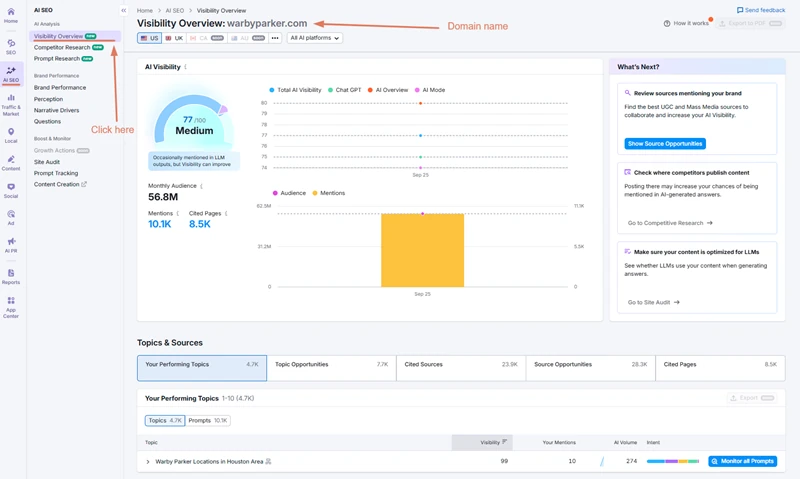
To view it:
- In SEMrush, go to AI SEO Toolkit → AI Visibility.
- Check your visibility score and see how it compares to competitors.
- Review Your Performing Topics to see where your content is currently being mentioned or cited.
- Explore Topic Opportunities — these are subjects your competitors appear for in AI summaries that you don’t yet cover.
You can even see which AI platform (ChatGPT, AI Overview, etc.) referenced your content and which queries or prompts triggered that mention.
Note: Detailed historical data and competitive insights require a paid plan, but even free users can track mentions and see their baseline visibility.
In short, use a mix of manual checks, GA4 source data, and SEMrush’s AI Visibility to monitor your progress:
| Tool | What it shows | Cost |
|---|---|---|
| AI tools (manual check) | Whether your site appears as a cited source | Free |
| GA4 | Actual traffic coming from AI domains (Perplexity, ChatGPT, Gemini, etc.) | Free |
| SEMrush AI Visibility | Mentions and visibility score across AI platforms | Limited free data; full insights on paid plan |
By combining these methods, you can see not just if AI assistants are referencing your travel blog — but also how those mentions translate into traffic, engagement, and growth.
FAQ: Travel blogging, SEO, and AI tools
Before you go and test this process on your own blog, here are some quick answers to the most common questions travel bloggers have about SEO, AI tools, and content visibility.
How can I make my travel posts easier for AI tools like Perplexity to understand?
Keep your posts simple and structured — use clear subheadings, answer one question per section, and include helpful visuals with descriptive captions or alt text. These small details make your content easier for both search engines and AI systems to read.
Will AI tools replace Google traffic for travel blogs?
AI assistants like ChatGPT, Perplexity, Gemini, or Copilot are designed to summarize information, not replace search engines altogether. While more people are starting to use AI to plan trips or ask for quick answers, Google remains the go-to place when travelers want to compare guides, see photos, read first-hand experiences, or check recent reviews.
For travel bloggers, the best approach is to create content that works for both:
- Keep your content optimized for Google search (clear structure, keywords, schema, links),
- But also formatted in a way that AI tools can understand and summarize easily (questions, headings, and concise answers).
Can I still rank on Google and be cited by AI assistants?
Absolutely — and in fact, the two often support each other. AI tools tend to rely on trusted, high-ranking sources when generating summaries or citing travel recommendations. So if your post already performs well on Google, it’s more likely to be recognized or cited by AI platforms, too.
To strengthen your visibility across both:
- Maintain technical SEO best practices (fast loading, mobile-friendly design).
- Build topical depth with related posts — for example, several guides about Ischia, Procida, and Capri.
- Use credible local sources and official links to signal reliability.
In short, when your blog is well-organized, helpful, and factually solid, it performs better everywhere — in search results and in AI-generated summaries.
How often should I update a travel post to stay AI-visible?
A good rule of thumb is to refresh your travel posts every 3–6 months, or whenever something changes — new ferry schedules, hotel closures, or seasonal attractions.
Even small updates can help:
- Add a new FAQ based on trending Perplexity questions.
- Replace outdated links with current official sources.
- Update local prices, opening times, or weather details.
Frequent updates signal freshness, which matters for both Google and AI models. It tells algorithms your content is current, accurate, and worth showing to travelers planning their next trip.
Do I need to use AI tools like Perplexity for every blog post?
Not necessarily. You can use an AI tool most effectively when:
- Writing destination guides or itineraries,
- Researching what travelers ask about a specific place,
- Or updating older content to fill missing details.
Think of it as your research assistant — a way to see what readers care about and what competitors might be missing. It’s there to support your SEO process, not replace it.
Do AI tools show which blog posts they’re using as sources?
It depends on the tool. Some AI assistants are more transparent than others when it comes to citing their sources.
Here’s a quick overview:
| AI tool | How it handles sources |
|---|---|
| Perplexity | Always includes detailed citations at the top of each answer and within the text itself, using a Wikipedia-style referencing system. Each sentence or paragraph that comes from a source has a small numbered reference you can click to see where that information came from. It’s currently the most transparent AI tool for tracking sources and verifying accuracy. |
| ChatGPT | Sometimes provides references, but not always. It depends on the query type and, in some cases, on whether you’re using the free or paid (Plus/Team) version. Paid users generally see more accurate and referenced answers when browsing is enabled. |
| Gemini (Google AI) | Doesn’t always show sources upfront, but you can click the “double-check response” button to see which web pages were used to verify the information. |
| Copilot (Microsoft) | Usually displays a few linked references at the end of the answer, especially for informational or research-based queries. |
| DeepSeek and other emerging tools | Often summarize without direct citations, though this is changing as AI systems add more transparency features. |
Bottom line:
Perplexity stands out for its transparency — its Wikipedia-style in-text references make it easy to see where every fact or suggestion comes from.
With other AI assistants, you may need to click through, use their verification features, or simply prompt again asking for references to check whether your travel blog was cited.
Wrap-up
Now that you know how to use Perplexity to plan, structure, and optimize your travel posts, it’s time to put it into action.
Start with one existing article — maybe one that’s getting impressions but not clicks. Use Perplexity to uncover what travelers are asking about that destination, add the missing details, and reorganize your post around real questions.
Once you see results, expand by building a content cluster around that same area — for example, if you optimized “A Week in Ischia,” follow it up with posts like “Best Beaches in Ischia” or “Ischia vs. Capri.” That’s how you build topical authority that both readers and search engines recognize.