When you create travel content, you already do the hard part. You write guides, share tips, and help people plan trips. However, search engines and AI tools do not “read” your content like humans do. They need extra signals to fully understand what your page is about.
That’s where schema markup comes in. Schema helps you explain your travel content in a clear, structured way. It tells search engines if a page is about a destination, a hotel, an attraction, or a full itinerary. Therefore, your content becomes easier to interpret, index, and sometimes feature in richer search results.
In this guide, you’ll learn what schema markup is for travel-related content and how it works. You’ll see which schema types matter most for travel blogs, how to choose the right ones, and how to write them without stress. We’ll also cover WordPress plugins, common mistakes, validation tools, and how schema supports both traditional search and AI-based answers. If you have little SEO or GEO knowledge, you’re in the right place.
Table of Contents
What is schema markup (in simple terms)?
Schema markup is a way to help search engines understand your content better. Instead of guessing what a page is about, search engines can rely on schema to read clear signals. For example, schema can show whether a page describes a destination, a hotel, a tour, or a blog article.
You can think of schema as labels you add to your content. These labels explain key details like the type of content, the author, the location, or important dates. Therefore, search engines do not need to interpret everything on their own.
When you use schema, you also help unlock richer search results. These are results with extra details, such as star ratings, FAQs, images, or event information. While schema does not guarantee these features, it makes your content eligible for them.
Schema markup uses a shared vocabulary from Schema.org. The most common format is JSON-LD, which Google recommends. Other formats exist, like Microdata or RDFa, but most bloggers never need them.
In short, schema does not change your content. However, it changes how search engines and AI systems understand it.
What elements does schema markup include?
Schema markup is not one single tag. It’s a small system made of parts that work together to describe your content clearly. You don’t need to remember all of them, but understanding the basics helps you avoid mistakes.
- @context – This tells search engines which vocabulary you’re using, usually Schema.org. You can think of it as setting the “language” of the structured data.
- @type – This defines what your content is. For example, a travel guide can be a BlogPosting, while a festival can be an Event. Choosing the right type is one of the most important steps.
- Properties – These are the details that describe your content. Think of them as fields you fill in. Common examples include name, description, URL, image, offers, or aggregateRating. Some are required, while others are optional but helpful.
- Entities – An entity is the main “thing” your schema describes, such as an article, a destination, or a person. Most pages focus on one main entity, even though multiple entities can exist.
- Data relationships – Schema connects entities to each other. For example, a BlogPosting can link to a Person as its author or to an Organization as its publisher. Therefore, search engines understand how different pieces of information relate.
- Optional elements – These add extra context. Properties like sameAs (social profiles) or inLanguage (content language) help clarify who you are and who your content is for.
In practice, you don’t need to use everything. Start with one clear entity, choose the right type, and add the most relevant properties.
Main schema types for travel-related content
BlogPosting schema for travel articles
For most travel blogs, this is the starting point. If your page is a travel guide, itinerary, or blog post, Article or BlogPosting schema is usually the right choice.
You should use BlogPosting when the page is clearly a blog post. This includes:
- destination guides,
- “things to do” articles,
- personal travel experiences.
Article works too, but BlogPosting is more specific and often a better fit for blogs.
This type of schema helps search engines understand that your content is editorial. It also clarifies who wrote it, when it was published, and what it’s about. Therefore, your travel post becomes easier to index and reference in both traditional and AI-based search.
Key properties to include (BlogPosting schema)
| Property | What it means | How to use it on a travel blog | Example value |
|---|---|---|---|
| @id | Unique identifier for the article | Usually the page URL with a fragment | https://example.com/3-days-seville/#blogposting |
| url | The URL of the blog post | Use the canonical page URL | https://example.com/3-days-seville/ |
| headline | The title of your blog post | Use the exact title shown on the page | 3 days in Seville: a relaxed itinerary |
| description | A short summary of the content | Align with your intro or meta description | A relaxed 3-day itinerary for first-time visitors to Seville |
| author | Who wrote the content | Usually a person (you) or your blog brand | Kat Stefanova |
| datePublished | When the post was first published | Match the visible publish date | 2025-03-18 |
| dateModified | When the post was last updated | Update after meaningful edits | 2025-04-10 |
| image | Main image for the article | Use the featured or header image | https://example.com/images/seville-itinerary.jpg |
| mainEntityOfPage | The main page being described | Use the canonical URL of the article | https://example.com/3-days-seville/ |
| keywords | Main topics covered in the article | Optional but useful for travel topics | Seville itinerary, things to do in Seville |
| about | The main subject of the article | Often a destination or attraction | Seville, Spain |
| mentions | Other important places referenced | Use for attractions or locations discussed | Alcázar of Seville, Plaza de España |
You don’t need to include every property to get started. Core fields like the title, author, dates, image, and page URL already help search engines and AI tools understand your article. If you want, you can add optional properties like keywords, about, or mentions to provide more context about destinations or attractions discussed in the post.
Whatever you include in the schema should always match what users see on the page. If your author name, dates, or other details aren’t visible in the content, don’t add them only in the schema.
When this schema is enough
For many travel posts, BlogPosting is all you need. You don’t have to add destination or attraction schema on every article. Start simple, especially if you’re new to schema.
When to combine it with other schema
Sometimes, a blog post also talks about a specific place or experience. In that case, BlogPosting can be the main schema, while other types support it. For example, an itinerary post can describe a destination inside the article schema instead of replacing it.
Before looking at destination and attraction schema, it helps to understand one simple idea: nesting. Nesting means placing one schema type inside another, instead of replacing it. In travel blogging, this is very common and very useful.
Example: how schema entities connect in a travel guide
A typical travel blog post describes several related entities at the same time. For example, imagine a post titled “3 days in Seville: a relaxed itinerary.” The structured data could look like this conceptually:
BlogPosting (travel article)

  ├── TouristDestination → Seville
  ├── TouristAttraction → Alcázar of Seville
  ├── TouristAttraction → Plaza de España
  └── Hotel → Hotel Alfonso XIII
In this structure:
- BlogPosting is the main schema because the page is an article.
- TouristDestination identifies the city the guide is about.
- TouristAttraction describes landmarks mentioned in the itinerary.
- Hotel can represent a place recommended in the guide.
This relationship helps search engines and AI systems understand how the places mentioned in your article connect to the main travel guide.
TouristDestination and TouristAttraction schema
When your content focuses on a place, not just a story, destination-related schema becomes useful. This applies to guides about cities, regions, beaches, landmarks, or must-see spots.
The two main schema types for travel locations are TouristDestination and TouristAttraction. They sound similar, but they serve different purposes:
- TouristDestination works best for broad places. Think cities, islands, regions, or countries. Examples include guides about Lisbon, Seville, or Iceland. A post like “Things to Do in Lisbon” or “Travel Guide to Seville” fits this type well.

- TouristAttraction is more specific. It describes a single point of interest. This includes places like the Colosseum, Eiffel Tower, Plitvice Lakes National Park, or Reynisfjara Beach. A post focused on one landmark, museum, beach, or natural site is a good match here.
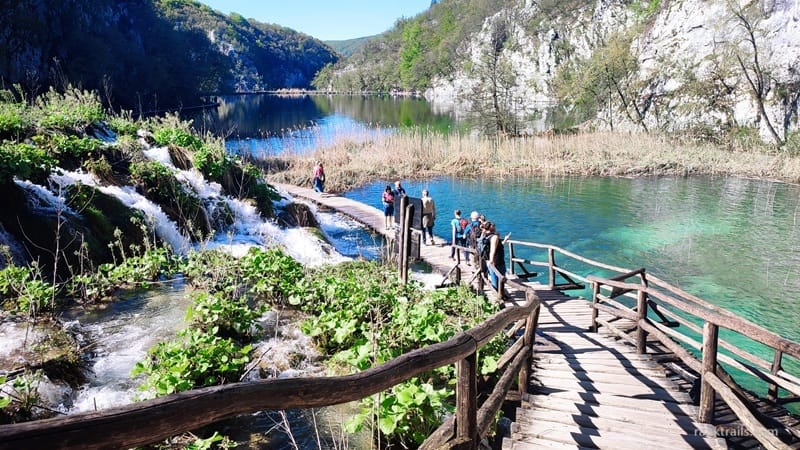
You usually choose one based on the main focus of the page. Therefore, always ask what the page is really about.
Key properties to include (TouristDestination / TouristAttraction)
| Property | What it means | How to use it on a travel blog | Example value |
|---|---|---|---|
| name | Name of the destination or attraction | Use the official or commonly used name | Plaza de España |
| description | Short factual explanation | Describe what the place is, not your opinion | A large square in Seville known for its tiled bridges and semicircular palace |
| address | Physical address | Useful for attractions and city locations | Av. de Isabel la Católica, Seville, Spain |
| geo | Latitude and longitude | Helps search engines understand the exact location | 37.3772,-5.9869 |
| image | Representative photo | Use a clear photo of the place | https://example.com/images/plaza-espana.jpg |
| touristType | Type of traveler | Optional; useful for niche travel content | cultural tourists |
| availableLanguage | Languages supported | Helpful for museums, tours, or visitor centers | Spanish, English |
| keywords | Topics related to the place | Optional; helps describe what the attraction is known for | Seville landmark, historic square |
| review | A review of the attraction | Only use if your article includes an actual review | Rating: 4.7/5 |
| url | Official webpage for the place | Link to the official website if available | https://visitasevilla.es/en/plaza-de-espana/ |
| sameAs | External references about the place | Link to trusted sources about the destination | https://en.wikipedia.org/wiki/Plaza_de_España,_Seville |
These properties should stay factual and neutral. Your personal experience belongs in the article text, not in the schema. Only include fields like review if the page actually contains that information.
If you want the table to be even more GEO/AIO-friendly, the most important properties for travel places are:
- name
- description
- geo
- address
- sameAs.
These strongly help AI systems understand which real-world place the article refers to.
How this works with blog posts
If the page is still a blog article, BlogPosting remains the main schema. The destination or attraction schema supports it instead of replacing it. This keeps your structured data clean and easier to understand.
Destination-related schema helps search engines connect your content to real-world places. It also helps AI-based search systems answer location-focused questions more accurately.
Hotel and LodgingBusiness schema
If your travel content talks about where to stay, accommodation-related schema becomes very useful. This applies to hotel reviews, “where to stay” guides, and detailed accommodation recommendations.
The most common schema types here are:
- Hotel: this is the best choice for traditional hotels. This includes boutique hotels, resorts, and large hotel chains. Examples could be reviews of places like Hotel Danieli or The Ritz London.
- LodgingBusiness: this is more flexible. It works well for guesthouses, B&Bs, apartments, agriturismi, or vacation rentals. If you write about an Airbnb-style stay or a family-run guesthouse, this type often fits better.
You should choose the type that best matches the accommodation itself, not how fancy it looks. Therefore, always base your choice on the business model, not marketing terms.
Key properties to include (Hotel / LodgingBusiness schema)
| Property | What it means | How to use it on a travel blog | Example value |
|---|---|---|---|
| name | Name of the accommodation | Use the official property name | Hotel Alfonso XIII |
| description | Short factual summary | Describe what the property offers | Historic luxury hotel near Seville Cathedral |
| address | Physical location | Include city, region, and country | San Fernando 2, Seville, Spain |
| image | Photos of the property | Use real images of rooms or exterior | https://example.com/images/hotel-alfonso.jpg |
| starRating | Official hotel classification | Use only if it’s accurate and visible | 5 stars |
| priceRange | Typical cost level | Helpful in “where to stay” guides | €€€€ |
| amenityFeature | Available amenities | Mention key amenities offered | Wi-Fi, pool, spa, breakfast |
| aggregateRating | Average review score | Use only if reviews appear on the page | 4.7 / 5 |
| geo | Exact geographic coordinates | Helps search engines locate the hotel | 37.3851, -5.9937 |
| url | Official website of the property | Link to the hotel’s official site | https://alfonsoxiiihotel.sevillahotel.com/en/ |
| sameAs | Trusted external references | Optional links to authoritative pages | https://en.wikipedia.org/wiki/Hotel_Alfonso_XIII |
All properties should reflect what users can actually see on the page. Never add ratings, prices, or amenities that are not mentioned in your content. Schema should describe the accommodation factually, not add information that isn’t visible to readers.
For travel bloggers, the most important properties are actually:
- name
- address
- geo
- image
- amenityFeature.
These help search engines and AI tools understand what place you’re recommending and where it is.
How this works with blog posts
Most of the time, BlogPosting stays your main schema type. The hotel or lodging schema supports it by describing the place you mention or review.
For example, a post like “Where to Stay in Venice: Best Areas and Hotels” can use BlogPosting as the main schema. Individual hotels mentioned in the article can be added as supporting entities.
Accommodation schema helps search engines understand that you’re talking about real places people can book. It also helps AI-based search systems answer questions related to stays, pricing expectations, and amenities.
LocalBusiness schema for tours, cafés, and experiences
Sometimes your travel content is not about a destination or a hotel. It’s about what to do or where to eat. In these cases, LocalBusiness schema is often the best fit.
You should use LocalBusiness when the page focuses on a real business people can visit or book. This includes guided tours, cooking classes, cafés, bakeries, wineries, or small experience-based businesses.
For example, this schema works well for:
- a food tour company in Rome
- a small café you recommend in Rimini
- a local cooking class in Tuscany.
A post reviewing a place like Café Tino or a guided experience offered by a local operator fits this category well.

LocalBusiness is also useful when no specific travel schema exists. There is no dedicated “Tour” schema, so LocalBusiness often fills that gap.
Key properties to include
| Property | What it means | How to use it on a travel blog | Example value |
|---|---|---|---|
| name | Business name | Use the official business name | Devour Tours Seville |
| description | What the business offers | Keep it factual and clear | Small-group food tours in Seville’s historic center |
| address | Physical location | Include full address if available | Calle Francos 19, Seville, Spain |
| geo | Latitude and longitude | Helps search engines understand the exact location | 37.3891, -5.9845 |
| image | Photos of the place or activity | Use real images of the venue or experience | https://example.com/images/seville-food-tour.jpg |
| openingHours | When the business operates | Add only if shown on the page | Mo-Sa 10:00–18:00 |
| priceRange | Typical cost level | Helpful for tours, cafés, and experiences | €€ |
| sameAs | Official website or social profiles | Link to trusted pages about the business | https://devourtours.com/blog/visit-spain/seville-travel-tips/ |
| url | Official business website | Use the primary website URL | https://devourtours.com |
| aggregateRating | Average customer rating | Use only if the page shows review data | 4.8 / 5 |
Only include information that appears on the page. If your article doesn’t show opening hours, prices, or reviews, don’t add them in the schema. Structured data should always match what readers can see in the content.
How this works with blog posts
In most cases, BlogPosting remains the main schema. The local business schema supports it by describing a specific place or experience mentioned in the article.
For example, a post like “Best Food Tours in Rome” can use BlogPosting as the main type. Each tour company mentioned can be added as a LocalBusiness entity inside the article context.
LocalBusiness schema helps search engines connect your content to real-world services. It also helps AI-based search systems answer questions like where to go, what to book, and what to expect locally.
Event schema for festivals and seasonal travel events
If your travel content focuses on something that happens at a specific time, Event schema is the right choice. This works well for festivals, cultural events, markets, concerts, or seasonal activities tied to dates.
You should use Event when the timing matters. The page should clearly answer when and where something happens. Therefore, Event schema fits posts that help travelers plan around dates.
Good examples include content about:
- Christmas markets
- music or food festivals
- annual cultural celebrations
- seasonal events like cherry blossom season.
For instance, guides about Oktoberfest, La Tomatina, or Venice Carnival are a natural match for Event schema.

This schema helps search engines understand that your content is time-sensitive. It also helps AI-based search tools answer questions like “What’s happening in X this month?”
Key properties to include
| Property | What it means | How to use it on a travel blog | Example value |
|---|---|---|---|
| name | Event name | Use the official event name | Venice Carnival |
| description | What the event is about | Keep it factual and concise | Annual festival in Venice known for elaborate masks and parades |
| startDate | When the event starts | Use ISO date format | 2025-02-15 |
| endDate | When the event ends | Required for multi-day events | 2025-03-04 |
| eventStatus | Event availability | Useful for canceled or postponed events | EventScheduled |
| eventAttendanceMode | Online or in-person | Important for hybrid events | OfflineEventAttendanceMode |
| location | Where the event takes place | City, venue, or region | Venice, Italy |
| image | Event visuals | Use official or representative images | https://example.com/images/venice-carnival.jpg |
| organizer | Who runs the event | Optional but helpful | Comune di Venezia |
| url | Official page for the event | Link to the official event website | https://www.carnevale.venezia.it |
| sameAs | External references | Links to trusted sources about the event | https://en.wikipedia.org/wiki/Carnival_of_Venice |
Event dates must always be accurate and visible on the page. Never add Event schema if the article doesn’t clearly show when the event takes place.
How this works with blog posts
Most of the time, BlogPosting stays your main schema type. The Event schema supports it by describing the specific festival or activity mentioned in the article.
For example, a post like “Best Festivals in Spain in Summer” can use BlogPosting as the main schema. Each festival inside the article can be added as a supporting Event entity.
Event schema is especially useful for travel planning content. It helps search engines and AI systems understand when something happens, not just where.
Tip: the minimum schema setup most travel blogs need
In most cases, travel blogs only need BlogPosting schema to start benefiting from structured data.
If you are new to schema markup, you don’t need to implement every schema type immediately. Most travel blogs already have a solid starting point without doing anything advanced.
Many SEO plugins automatically add the basic schema needed for a blog post. This usually includes:
- BlogPosting schema
- Author information
- Featured image
- Publish and update dates.
This setup already helps search engines understand that your page is an article and who created it.
Other schema types — such as TouristDestination, Hotel, Event, or LocalBusiness — can be added later when your content focuses strongly on a specific place, stay, or experience.
Start simple. Clear and accurate schema is always better than complex markup that doesn’t match the content.
How to choose the right schema type and properties
Choosing a schema type is not about adding as much structured data as possible. It’s about adding the right data for the travel page you’re publishing. If you get this step right, everything else becomes easier.
- Identify the main purpose of the page
Ask yourself what the page is mainly about. Is it a travel guide, a destination overview, a hotel review, or an event? The answer should determine your primary schema type.
- Choose one primary schema type
Most pages work best with one main schema. For example, a travel guide usually uses BlogPosting. Other schema types, like destinations or hotels, can appear as supporting entities.
- Make sure schema matches page intent
Schema should describe what the page actually does. A personal itinerary is editorial content, so BlogPosting fits best. A page describing a place or attraction may include destination or attraction schema.
- Add only properties supported by your content
Every schema property should match visible information on the page. If the article doesn’t show ratings, prices, or opening hours, don’t include them in the schema.
Tip: Use Google’s rich result guidelines to see which properties search engines expect. However, don’t copy schema from other sites. Their structure may not match your content.
How to write schema markup (without coding stress)
Writing schema markup sounds technical, but in practice, it’s very manageable. You don’t need to be a developer, and you don’t need to memorize code. You only need to understand the structure and where it goes.
JSON-LD explained simply
The easiest and safest way to add schema is JSON-LD. This format keeps structured data separate from your visible content. Therefore, it does not interfere with your design or layout.
JSON-LD is added as a script, usually in the page header or body. Search engines can read it, but users never see it. This is why it’s the format recommended by Google and supported by most SEO plugins.
You don’t need to write JSON-LD from scratch. Think of it as a structured list of information about your page, written in a specific format.
A simple BlogPosting schema example (with real values)
Let’s imagine you published this blog post:
Title: 3 days in Seville: a relaxed itinerary for first-time visitors
It’s a classic travel guide about Seville, so BlogPosting is the right schema type.
Here’s how the main properties would look, with concrete example values.
{
  "@context": "https://schema.org",
  "@type": "BlogPosting",
  "@id": "https://yourblog.com/3-days-in-seville-itinerary/#blogposting",
  "url": "https://yourblog.com/3-days-in-seville-itinerary/",
  "headline": "3 days in Seville: a relaxed itinerary for first-time visitors",
  "description": "A slow-paced 3-day itinerary covering Seville’s highlights, local food, and historic neighborhoods.",
  "author": {
    "@type": "Person",
    "name": "Kat Veselinova"
  },
  "datePublished": "2025-03-18",
  "dateModified": "2025-04-10",
  "image": "https://yourblog.com/images/3-days-seville.jpg",
  "mainEntityOfPage": {
    "@type": "WebPage",
    "@id": "https://yourblog.com/3-days-in-seville-itinerary/"
  }
}
Again, you don’t need to write this by hand. Most SEO plugins generate it automatically. What matters is that every value matches what users can actually see on the page.
Manual vs automatic schema
You have two main options when adding schema: manual or automatic.
Automatic schema usually comes from WordPress SEO plugins. These tools generate basic schema for articles, authors, and websites. For beginners, this is often enough and much safer than editing code directly.
Manual schema gives you more control. You can add specific travel-related schema, adjust properties, or support complex pages. However, it requires more attention and regular checks.
For most travel bloggers, a mix works best. Let plugins handle the basics, and add manual schema only when you need something specific. Therefore, you avoid errors while still improving clarity.
| Approach | What it is | When it works best | Things to keep in mind |
|---|---|---|---|
| Automatic schema | Schema generated by WordPress SEO plugins | Basic blog posts, author pages, simple travel guides | Limited control, but safer for beginners |
| Manual schema | Schema you add or customize yourself | Travel-specific content, destinations, hotels, events | Requires more care and regular checks |
| Mixed approach | Plugins for basics, manual for specific needs | Most travel blogs | Best balance between safety and flexibility |
Schema doesn’t need to be perfect to be useful. Clear, accurate, and simple markup always beats complex setups that don’t match the content.
WordPress plugins to add schema automatically
If you use WordPress, plugins make schema much easier to manage. They help you add structured data without touching code. For beginners, this is often the safest way to start.
Most SEO plugins add basic schema automatically. This usually includes BlogPosting, author, and website information. Therefore, you already get a solid foundation without extra work.
Below are some popular options travel bloggers often use.
- Rank Math: is one of the most flexible SEO plugins for schema. It adds article schema by default and lets you choose schema types per post. You can also add extra schema, like destinations or local business, using built-in options. However, advanced setups still require some learning.
- Yoast SEO: focuses on simplicity and stability. It handles basic schema well, including articles, authors, and breadcrumbs. For many travel blogs, this is enough. However, Yoast offers less control over travel-specific schema types.
- Schema Pro: focuses only on structured data. It allows more customization and supports many schema types. This can be useful if schema is a priority for your site. However, it adds another plugin to manage, which may feel heavy for beginners.
When plugins are enough: if you mainly publish blog posts, guides, and itineraries, plugin-generated schema is usually sufficient. It covers the basics and reduces the risk of errors.
When plugins are not enough: if you write detailed content about hotels, attractions, events, or local experiences, plugins may not cover everything. In those cases, you can extend the schema manually for specific pages.
Important plugin tips:
- Avoid using multiple schema plugins at the same time.
- Check for duplicate schema output.
- Always make sure the schema matches visible content.
Note: Your WordPress theme may already add schema
Some WordPress themes include basic schema markup by default, such as article or breadcrumb schema. If you install an SEO plugin like Yoast or Rank Math, it may generate the same schema again.
To avoid duplicate structured data, check your theme settings and disable overlapping schema features. In most cases, it’s best to let one tool handle schema, not several.
Plugins are tools, not shortcuts. They work best when your content is clear and well structured. Start simple, then improve only when you see a real need.
Common schema mistakes travel bloggers should avoid
Below are common schema mistakes, why they cause problems, and what to do instead.
| Travel-specific mistake | Why it’s a problem | What to do instead |
|---|---|---|
| Marking a travel guide as a TouristAttraction | The page is an article, not a place | Use BlogPosting as the main schema |
| Adding hotel schema to a “where to stay” list | You’re not the hotel business | Describe hotels as supporting entities |
| Including prices or ratings you don’t show | Creates a mismatch with visible content | Add schema only for info shown on the page |
| Using every schema type in one post | Confuses search engines and AI tools | Stick to one main schema per page |
| Copying schema from big travel sites | Their pages serve different purposes | Base schema on your own content |
| Forgetting to update event dates | Makes content look outdated | Update schema whenever dates change |
| Trusting “valid” status too much | Valid schema can still be misleading | Check intent, not just validation results |
Why this matters for ai-based travel search
AI tools answer questions like “Where should I stay?” or “What’s worth visiting?” They use schema as a supporting signal when it clearly matches travel intent.
When your schema reflects real travel content:
- AI systems extract more accurate answers,
- your content is less likely to be ignored,
- trust signals improve over time.
In short, good schema helps AI understand what you’re recommending, not just what you wrote.
How to validate and test your schema
After adding a schema, you should always check that it works as expected. Validation helps you catch errors early and understand how search engines read your structured data. This step matters for both traditional search and AI-based systems.
Use Google Rich Results Test
The Rich Results Test shows whether your schema is eligible for enhanced search results. You paste a URL or code snippet, and the tool highlights errors and warnings. Therefore, it’s the best first check after publishing or updating a page.
This tool focuses only on schema types that Google supports for rich results. If something does not appear here, it doesn’t mean your schema is wrong.
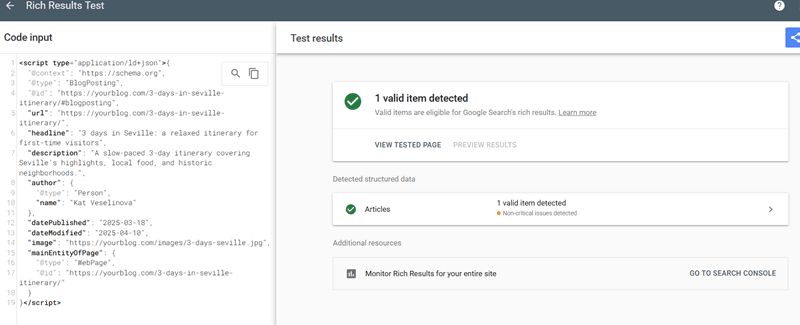
Use the Schema Validator
The Schema Validator checks whether your structured data follows Schema.org rules. It validates all schema types, not just those used for rich results. This makes it useful for travel-specific schema like TouristDestination or TouristAttraction.
Use this tool to confirm structure, nesting, and property names. However, remember that “valid” only means technically correct, not strategically useful.
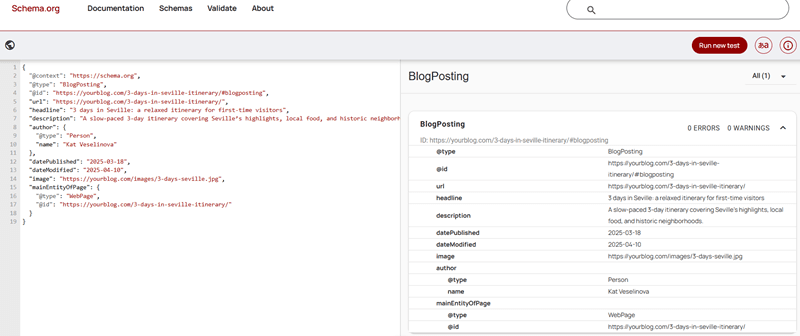
Check enhancements in Google Search Console
In Google Search Console, the Enhancements section shows schema detected across your site. You can see errors, warnings, and affected pages. This view helps you monitor issues at scale, not just page by page.
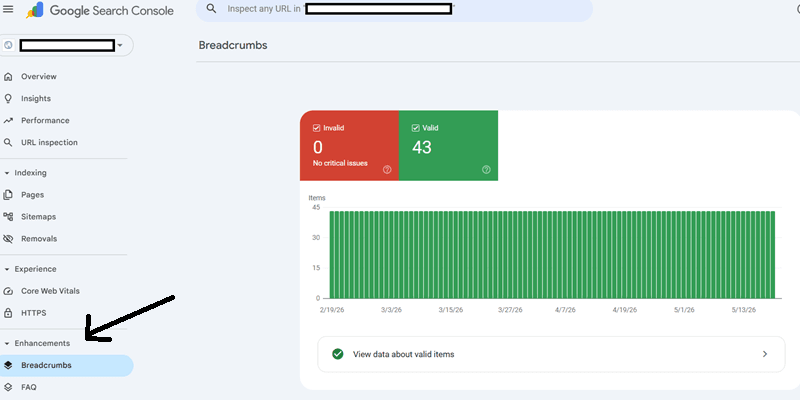
Fix errors first, then review warnings. Warnings are not always bad, but they often point to missing recommended properties.
Understand errors vs warnings
Errors usually mean search engines cannot read your schema correctly. These should always be fixed. Warnings suggest optional improvements. You don’t need to resolve all warnings, but review them carefully.
Validate after content updates
If you change dates, prices, events, or locations, recheck your schema. Outdated structured data creates inconsistencies. Therefore, validation should be part of your update workflow, not a one-time task.
Validation tools help you confirm technical accuracy. However, always do a final manual check. Ask yourself if the schema truly reflects what users see on the page.
Schema for traditional search vs AI-based search
Schema markup helps both traditional search engines and AI tools. However, they use it in different ways. Seeing this through travel examples makes the difference clearer.
How schema works in traditional travel search
In traditional search, schema helps search engines understand what type of travel content you published. It can make your page eligible for richer results, but it does not improve rankings on its own.
For example:
- A blog post titled “3 days in Seville: a relaxed itinerary” uses BlogPosting schema
- Search engines understand it as an editorial travel guide
- The result may show enhanced details, such as the author or publication date.
Schema here acts as a confirmation layer. It supports your content, but it doesn’t replace good writing or SEO basics.
Example: how schema can support richer travel search results
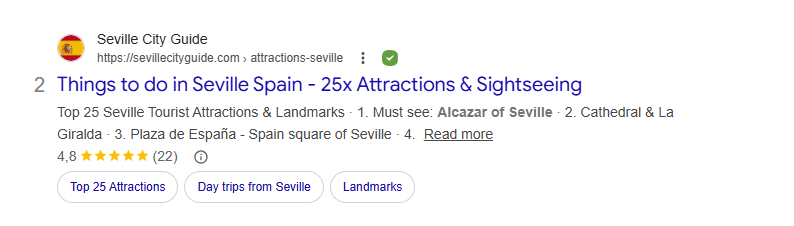
If you search for “things to do in seville”, you may see results that include extra details beyond the normal blue link. For example, a travel article might appear with:
- a star rating
- the number of reviews
- additional topic links under the result (like attractions or day trips).
These elements make the result more visible and informative before users even click.
In the example above, the search result shows:
- a 4.8 rating
- 22 reviews
- quick links like Top 25 attractions and Day trips from Seville.
These elements are often generated from structured data on the page.
How schema contributes to this
Structured data helps search engines understand what the page contains. Depending on the schema used, it can support several enhanced search features:
- Review and rating schema: if a page includes visible reviews and rating data, schema such as Review or AggregateRating can help search engines display star ratings in search results.
- Article schema: using BlogPosting schema helps Google understand that the page is an editorial travel guide.
- Entity references: when a page clearly references places such as Seville, Alcázar of Seville, or Plaza de España, search engines can connect the article to those real-world locations.
Important: schema does not guarantee rich results
Structured data only makes a page eligible for enhanced results. Search engines decide whether to show them. However, clear schema improves the chances that your travel content is interpreted correctly and displayed in richer ways.
How schema supports ai-based travel search
AI tools focus on answering travel questions, not displaying search results. They look for clear signals about what the content represents and who it’s for.
For example:
- A user asks: “What are the main attractions in Seville?”
- Your article includes BlogPosting schema with a supporting TouristDestination entity for Seville
- The AI can confirm that your content is about a real place and extract relevant information more confidently.
Another example:
- A user asks: “Where should I stay in Venice?”
- Your post uses BlogPosting schema and mentions hotels using Hotel or LodgingBusiness schema.
- The AI can distinguish recommendations from official business listings.
The key difference for travel content
Traditional search cares about eligibility and presentation. AI-based search cares about intent and accuracy.
For travel bloggers, this means:
- Schema helps search engines understand your post structure.
- Schema helps AI tools understand travel context and relationships.
- Clear schema reduces misinterpretation of guides, lists, and reviews.
Schema is not a ranking trick. It’s a way to make your travel content easier to understand, reuse, and trust, by humans and machines alike.
A practical schema check before publishing
Before publishing (or updating) a travel post, walk through this quick check.
1. What kind of travel page is this?
Ask yourself:
- Is this an itinerary or travel guide? → BlogPosting
- Is this about one place? → Destination or attraction (supporting)
- Is this a list of stays or tours? → BlogPosting + hotel or local business entities.
If the answer isn’t clear, your schema won’t be either.
2. Does the schema describe the place, not your opinion?
- “Seville is a historic city in southern Spain” → fine for schema
- “Seville is my favorite city in Spain” → content only.
Schema should stay factual. Your experience stays in the article.
3. Are you marking businesses you don’t own correctly?
- Hotel reviews → Hotel as a supporting entity
- Food tours or cafés → LocalBusiness as a supporting entity
- Never mark yourself as the business unless you run it.
This is a very common travel-blog mistake.
4. Does this post depend on timing?
If yes:
- Are event dates visible in the content?
- Does the schema match the current year or season?
Old dates in schema make travel content look unreliable.
5. Does the schema still match after updates?
Travel posts get updated a lot. After editing:
- Check dates and locations
- Revalidate schema
- Update dateModified.
If you changed the content meaningfully, the schema should reflect that.
6. Quick validation, not perfection
- Check for errors, not zero warnings
- Make sure the page intent is clear
- Avoid adding schema “just because you can”.
Good schema helps search engines and AI tools trust your content. It doesn’t need to be complex.
Conclusion: start small, but start right
Schema markup helps search engines and AI tools understand your travel content, not rewrite it. When it reflects what your page is really about, it adds clarity and trust behind the scenes.
You don’t need advanced setups to benefit from schema. One clear main schema type, plus a few supporting entities when needed, is enough for most travel blogs. Therefore, focus on accuracy and intent instead of complexity.
Used well, schema supports your guides, itineraries, and recommendations without changing how you write.
Key takeaways for travel bloggers:
- Start from the page intent, not the schema type
- Use one primary schema per page
- Keep schema factual and visible in the content
- Treat destinations, hotels, and experiences as supporting entities
- Validate after publishing and after updates.
If the schema matches your travel content clearly, it’s already doing its job.